
Making a research conference easier to navigate, follow, and share
Institut Teknologi Bandung (ITB), established in 1920, is Indonesia’s oldest technology-oriented university. Its role extends beyond teaching. ITB also contributes to the exchange of research and professional knowledge in Indonesia and internationally.
When ITB hosted the first International Conference on Data and Software Engineering (ICoDSE 2014), it brought together researchers and professionals to present and discuss work in data and software engineering. The event needed to support many information needs at once: schedules, speakers, discussion topics, materials, and participant communication.
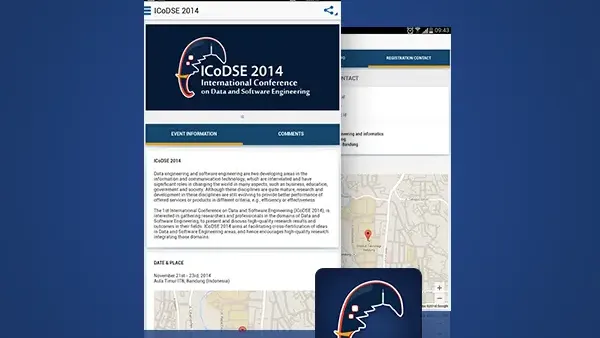
Suitmedia developed the ICoDSE mobile application to give attendees a simpler way to access the conference experience. The app brought event information, reminders, downloadable insights, feedback, and social sharing into one mobile platform, helping participants stay informed before and during the conference while contributing to the event community.
A high-value conference had too many details to manage manually
1. Important information was spread across the event journey
An academic conference involves more than a program of presentations. Attendees need to understand the schedule, identify speakers, choose relevant sessions, review discussion topics, and prepare for the conversations they want to join.
When this information is distributed through printed materials, email, websites, and announcements, attendees must assemble the experience themselves. That creates unnecessary work and increases the likelihood that they miss something important.
ITB needed a more direct way to provide the information attendees required. The platform had to reduce the search burden while preserving the depth expected from an international research event.
2. Attendees had different reasons for participating
Researchers, academics, students, and industry professionals might attend the same conference, but they would not necessarily follow the same path.
One participant might focus on a particular technical topic. Another might want to follow a specific speaker. A third might need to move between sessions while keeping track of the wider program.
The application needed to serve these different intentions without forcing every attendee through one fixed route. A flexible information structure would allow users to personalize how they engaged with the event.
3. Printed programs were useful but limited
A printed program can provide a complete overview, but it is not always convenient to carry, search, or update.
Schedules can change. Speakers may be added or sessions adjusted. Printed information cannot easily notify attendees when something changes.
A mobile application could provide a more responsive alternative. It could keep information in one place and make updates, reminders, and additional content easier to deliver.
4. Attendees needed timely reminders
Conference schedules are often dense. Participants may want to attend several sessions but lose track of time, location, or the next speaker.
A personal reminder could help users manage their schedules more effectively. Instead of relying on memory or repeatedly checking a printed program, attendees could receive a prompt about what was coming next.
This was not only a convenience feature. Better reminders could help improve attendance across sessions and reduce the chance that valuable presentations were missed.
5. Speaker information needed to be easy to access
Speakers are a major reason people attend academic conferences. Attendees want to understand their background, expertise, and the topics they will discuss.
If speaker information is difficult to find, participants may not be able to decide which sessions are most relevant to them. The app needed to bring this information closer to the schedule and discussion topics.
This would help users make more informed choices before and during the event.
6. Discussion topics needed more context
Research presentations can involve technical subjects that require preparation. Attendees may want to review a topic before entering a session or revisit key themes afterward.
The platform needed to provide more than titles and times. It had to offer insights into discussion topics and make supporting material accessible.
This helped participants engage at a deeper level. They could arrive with better context and use the conference as a more meaningful learning and networking experience.
7. The event needed a way to hear from participants
An event is not complete when organizers deliver information. Attendees also have questions, reactions, and suggestions that can improve the experience.
ITB needed a way to gather feedback while the conference was happening. Real-time feedback is more useful than relying only on a post-event survey because organizers can see reactions while the event is still active.
The application therefore needed to give participants a voice, not only a schedule.
8. Conference participation was increasingly social
Attendees often share event experiences through social media. They may post about a speaker, discuss a topic, or tell colleagues which sessions they are attending.
If sharing is difficult, the event loses opportunities to extend its reach beyond the venue. ITB needed an app that made it easy for participants to share relevant content while remaining connected to the conference.
Social sharing could help create a wider public conversation around ICoDSE and its research themes.
9. The platform had to remain uncomplicated
The conference already involved complex subject matter. The application should not add complexity through a confusing interface.
Attendees needed to understand the app quickly, particularly if they opened it just before a session or while moving through the venue.
The design challenge was to provide rich information through a simple structure. Users should be able to find what mattered without learning how the platform worked first.
Designing the mobile experience around the attendee’s next decision
1. Create one mobile destination for the conference
Suitmedia developed the ICoDSE mobile application to centralize key event information.
The app gave attendees a single place to check schedules, explore speakers, review discussion topics, receive reminders, and access supporting materials.
This reduced the need to move between different sources. The application became a practical companion throughout the conference rather than another channel competing with existing ones.
2. Make event information available at a tap
The app was designed to provide detailed conference information through a simple mobile interaction.
This supported quick access in the moments attendees needed it. Users could check details while preparing for a session, navigating the event, or deciding what to attend next.
The design principle was straightforward: conference information should be easy to reach without interrupting participation in the event itself.
3. Let users manage their own schedules
Attendees could receive personal reminders about the event schedule.
This gave users more control over the sessions they wanted to attend. They did not need to track every presentation manually or rely on a general announcement for the next activity.
Personal reminders also made the event feel more responsive to individual interests. The app could support each attendee’s priorities rather than presenting the conference as one fixed program.
4. Present speakers as part of the decision process
Speaker information was made available within the app so attendees could understand who was presenting and what expertise they brought.
This helped users decide which sessions were most relevant. It also gave the conference a stronger human dimension by connecting research topics with the people behind them.
The feature supported both preparation and discovery. Attendees could plan in advance or explore speakers during the event.
5. Connect speakers with sessions and topics
Speaker information was more useful when connected to schedules and discussion subjects.
This allowed attendees to move naturally from “Who is speaking?” to “What are they discussing?” and “When should I attend?”
Connecting these elements reduced the need for users to search through separate pages. It also made the conference program feel like a connected knowledge experience.
6. Provide downloadable discussion insights
The app allowed users to download and view insights related to discussion topics.
This gave attendees additional context before sessions and a reference they could revisit later. Downloadable content also supported use in settings where connectivity might be limited.
The feature added depth without making the main interface heavy. Users could choose whether they wanted a quick overview or more detailed material.
7. Keep supporting information accessible after the event
Conference content can continue to provide value after the final session. Attendees may want to revisit topics, remember a speaker’s work, or share insights with colleagues.
By making supporting information available through the app, ITB extended the useful life of the event.
This created a second-order benefit. The conference became not only a live gathering, but also a digital reference point for continued learning and professional connection.
8. Make feedback available in real time
The application included features that allowed attendees to contribute feedback during the event.
Real-time feedback helped ITB understand what participants were experiencing while there was still an opportunity to respond or adjust.
It also made attendees feel more involved. Their opinions were not limited to a survey after the conference; they could contribute to the event as it unfolded.
9. Give participants a role in improving the event
Feedback transformed attendees from passive recipients into contributors.
Participants could share reactions, identify issues, and communicate what was useful to them. This created a stronger relationship between the conference organizers and the people attending.
The feature also supported future improvement. ITB could use participant input to refine session planning, communication, and event operations in subsequent conferences.
10. Make social sharing simple
The app allowed users to share conference content through social media.
This reduced the effort required to tell others about a session, topic, or event moment. Sharing became part of the participant experience rather than a separate activity requiring copied links or manual searches.
Simple sharing also increased the chance that ICoDSE would reach people beyond the venue. Attendees could introduce the event and its subject matter to their own professional and academic networks.
11. Let the community extend the conference
When attendees share content, they help create a broader conversation around the event.
A research conference can benefit from this extended discussion. People who could not attend may discover the topics, speakers, and ideas through participant posts.
This helped ITB position ICoDSE as more than a closed event. The conference could become part of a wider exchange around data and software engineering.
12. Use a simple interface to support complex content
The application used a high-quality user experience to present detailed information without making the platform difficult to navigate.
Simple layouts and clear access points helped users focus on conference content instead of interface mechanics.
This balance was especially important for a technical event. The app needed to support the complexity of the subject matter while remaining simple enough for everyday use.
13. Design for different attendee contexts
Attendees might use the app before arriving, while moving between sessions, during a presentation break, or after returning home.
The mobile experience needed to support these different contexts. Information had to be readable quickly, actions had to be easy to identify, and content had to remain useful beyond the live event.
Designing for context made the app more practical than a static event webpage.
14. Build a platform that could support future conferences
Although developed for ICoDSE 2014, the structure created a reusable model for future academic and professional events.
Schedules, speakers, topic insights, reminders, feedback, and sharing could be adapted for new programs and conferences.
This gave ITB more than a single event tool. It created a digital foundation for improving how it hosted and communicated future knowledge exchanges.
The app made the conference easier to follow and easier to extend
1. Attendees gained one place for essential information
The ICoDSE application brought schedules, speakers, topics, reminders, insights, and feedback into one mobile experience.
This reduced the effort required to manage the event and helped attendees focus on the content and connections that mattered.
The app became a practical layer around the conference, supporting both preparation and participation.
2. Personalized reminders improved schedule control
Users could receive reminders related to the event schedule and the sessions they cared about.
This helped them manage a dense program with more confidence. They were less dependent on memory or repeated checks of a printed agenda.
The result was a more personalized conference experience. Each attendee could organize the event around their own interests.
3. Speaker and topic information supported better choices
Access to speaker profiles and discussion insights helped users determine which sessions were most relevant.
This improved the quality of participation. Attendees could arrive better prepared and engage more thoughtfully with the research being presented.
The app supported not only attendance, but informed attendance.
4. Downloadable material extended the value of sessions
The ability to download and view topic insights allowed users to revisit information after a presentation.
This helped the conference continue beyond the room and the scheduled session. Participants could use the content for further study, discussion, or professional reference.
The digital layer gave the event a longer memory.
5. Real-time feedback strengthened community participation
The app gave attendees a way to contribute feedback while the conference was happening.
This improved communication between organizers and participants and created a stronger sense of involvement.
Feedback also gave ITB a source of information for future event improvements. The platform supported learning for both attendees and organizers.
6. Social sharing expanded the event’s reach
Easy sharing allowed attendees to introduce ICoDSE topics and experiences to people outside the conference.
This helped increase awareness of the event and the academic subjects it covered. It also encouraged participants to become informal ambassadors for the conference.
The result was a wider conversation around data and software engineering.
7. The application contributed to event engagement
By combining information access, reminders, downloadable materials, feedback, and sharing, the app gave users several ways to interact with ICoDSE.
This created a more active community experience than a website or printed program alone could provide.
The event became easier to follow, easier to discuss, and easier to remember.
8. ITB gained a stronger model for future events
The platform created a reusable approach to conference communication and attendee engagement.
ITB could build on the structure for future events rather than treating each conference as a completely new digital project.
This improved long-term efficiency and created a clearer path for continuing to strengthen the digital side of academic events.
9. The app helped connect research with professional community
ICoDSE brought researchers and professionals together. The application supported that purpose by making speakers, topics, insights, and discussions easier to access.
Social sharing and feedback extended the connection beyond the formal sessions.
The result was a stronger bridge between academic content and the wider professional community interested in data and software engineering.
10. The experience demonstrated ITB’s role as a technology institution
A well-designed conference app also reflected ITB’s identity as Indonesia’s oldest technology-oriented university.
The platform showed that ITB could use digital tools not only to host research discussions, but also to improve how knowledge was shared and experienced.
The app supported the event operationally while reinforcing ITB’s broader commitment to innovation in education.
The deeper lesson: conference apps should turn information into participation
1. A schedule is only useful when people can act on it
Attendees need more than a timetable. They need reminders, speaker context, topic information, and a way to organize the program around their interests.
The app made the schedule actionable rather than static.
2. Personalization improves conference value
A conference serves many interests at once. Personal reminders and accessible speaker information help each attendee create a more relevant experience.
Personalization does not require a complex system. It can begin with simple controls that help users decide what matters to them.
3. Supporting content should be available before and after the event
Research discussions benefit from preparation and reflection.
Downloadable insights allowed attendees to engage more deeply before sessions and revisit ideas later. This increased the value of the event beyond its scheduled hours.
4. Real-time feedback supports better event management
Feedback collected during an event is more immediate and actionable than feedback gathered long afterward.
It helps organizers understand what is working while participants are still present and creates a stronger basis for future planning.
5. Social sharing turns attendees into distribution partners
Participants can extend an event’s reach through their own networks when sharing is easy.
This is especially valuable for academic and professional conferences, where ideas can continue spreading after the event ends.
6. Good UX makes complex content approachable
Data and software engineering can be technically demanding subjects. A clear application helps users access the content without adding another layer of complexity.
The interface should simplify access while preserving the depth of the event itself.
7. Digital platforms can strengthen academic communities
A conference app is not only an event utility. It can support relationships among researchers, professionals, students, and institutions.
By making content and participation more accessible, the platform can help a conference become a community rather than a single gathering.
8. Event technology should create reusable capability
The value of a conference platform grows when it can support future events, new programs, and changing audience needs.
A reusable foundation reduces repeated effort and allows each new conference to improve on the last.
Strategic Insights for the C-Suite
- Design event platforms around attendee decisions, not only event information. Schedules, speakers, topics, reminders, and materials should help users decide where to go and what to engage with next.
- Use digital tools to extend the life of knowledge events. Downloadable materials, post-event content, and social sharing allow a conference to continue creating value after the final session.
- Make participation easy and visible. Feedback, comments, sharing, and reminders help attendees become active contributors rather than passive recipients of information.
- Treat user experience as part of academic credibility. A clear, reliable platform reflects the quality of the institution hosting the event. Good design helps complex research feel accessible without reducing its substance.
- Build conference technology as reusable infrastructure. A well-designed event platform can support future programs and improve over time. Each event should add to the institution’s capability rather than start from zero.